Jev explained simply: when to use it instead of ChatGPT

What Jev actually is
Jev is a new AI model from TypeSafe, a San Francisco lab started by former OpenAI researcher Diogo Almeida. It came out of stealth on September 15 with $40M in seed funding.
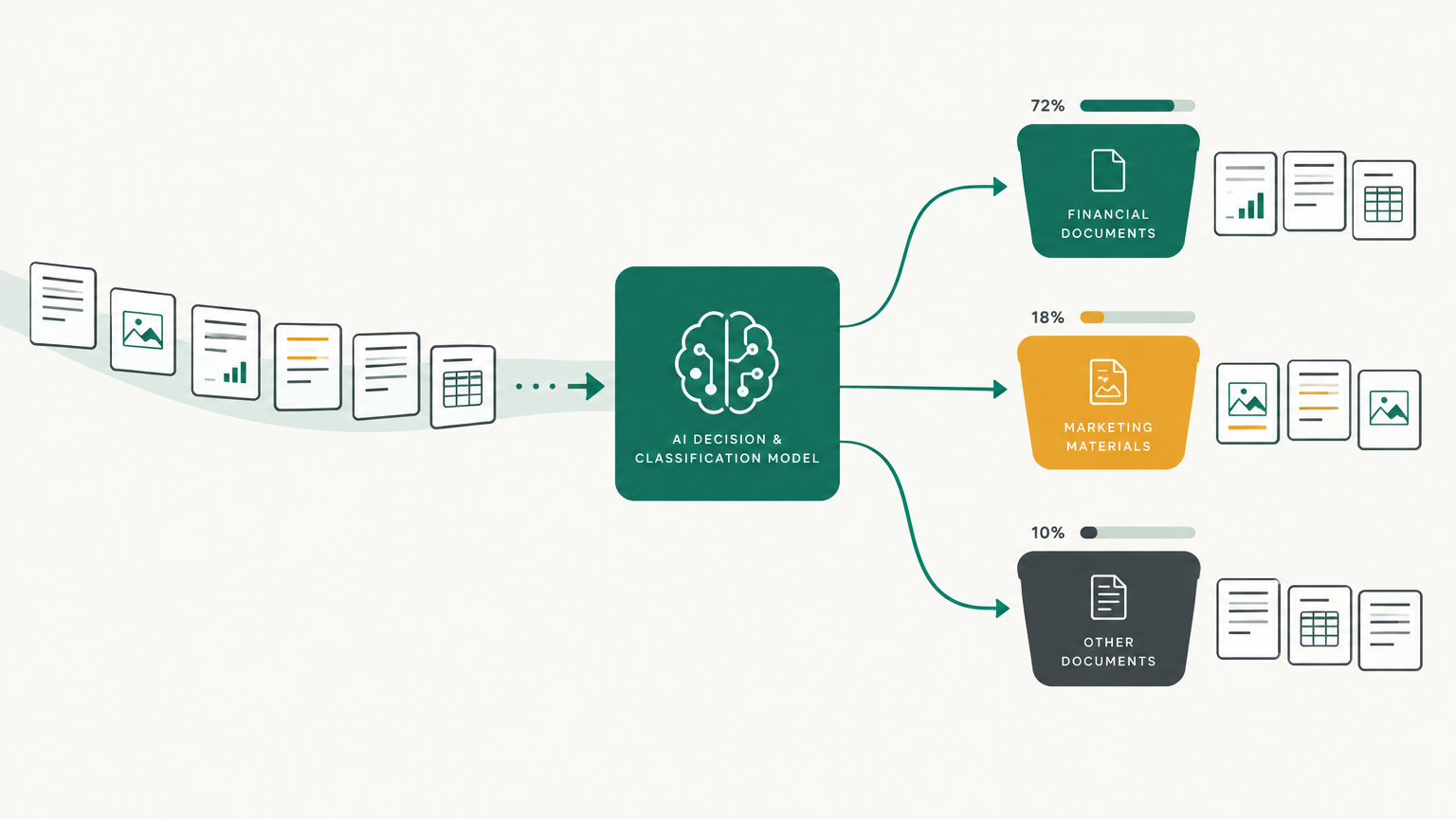
Jev doesn't write anything. You give it some text and a list of questions, and it answers each question by picking from options you wrote in advance. Is this email a sales lead? Which team should handle this ticket? How ready to buy is this person, on a scale you describe? It sends back the answer plus a probability for every option, usually in about a tenth of a second.
The easiest way to think about it is a smart "if" statement. Your automation already branches on things it can check, like whether an order is over $100. Jev lets it branch on things that need understanding, like whether a customer is angry.
How it works
Every question you ask is one of three types.
A yes/no question returns a probability that the answer is yes. "Does this customer ask for a refund?" might come back at 0.93.
A choice question picks one option from a list you wrote, such as billing, technical, sales, or other. You get the winning option and how likely each of the others was.
A score question places the text on a scale you describe in plain words, like "just browsing," "comparing options," and "ready to buy with a budget and timeline."
The part that makes it useful for automation is the confidence number that comes with each answer. When Jev is sure, your workflow can act on its own. When it isn't, the item goes to you. With ChatGPT you get a confident-sounding answer either way.
You can also ask all your questions in one call. They run side by side against the same text, so asking five costs barely more than asking one.
What Jev is better at than an LLM
The rule of thumb is simple. If the answer comes from a list you could write down in advance, and you need to make that call many times, Jev is the better tool. If the output is words, use an LLM.
Here's where people have put it to work in the first two weeks.
Labeling big lists. One builder sorted 1,018 AI research papers into 24 topics for 8 cents. Another broke down 724 live ads from 37 brands in about 40 seconds for 9 cents, tagging each one's hook, format, offer, and call to action. One developer checked his resume against all 6,245 Y Combinator companies in 25 seconds for 37 cents and came away with 156 founders worth contacting. Any job that looks like "go through every row and label it" fits.
Routing work before an LLM touches it. Jev sits at the front of a workflow and decides where each item goes. In a support inbox, "where's my order?" goes to a simple lookup, product questions go to an LLM with the right context, and angry complaints go to a person. The expensive model only runs when it's needed. Metaview, a recruiting platform, says it added Jev to every agent on its platform over a weekend, and candidate searches went from minutes to seconds with the same accuracy.
Checking another AI's work. Because each check costs a fraction of a cent, you can check everything instead of spot-checking. An engineer at Vercel told TechCrunch they replaced the LLM that reviewed commands for safety with Jev and got results 5 to 18 times faster, with better accuracy. The same idea works for content. An LLM writes a summary, and Jev asks of each claim, "Is this supported by the source?"
Search that understands what people mean. A cheap keyword search finds the candidates and Jev ranks them by meaning. jevsearch, an open source site search built this way, reports a median of 278 milliseconds and 26 cents per 1,000 searches.
Small smart features inside apps. Spliit, an open source expense splitter, now suggests a category for each new expense and asks the user to confirm only when Jev is unsure. Someone else built a browser extension that asks, for every post in a social feed, whether it's rage bait, crypto promotion, or political argument, and hides the ones that score high.
Anything that needs to feel instant. At a few hundred milliseconds per call, Jev can run while someone types. One editor demo scores the tone and urgency of a draft live, including whether it reads as AI-written.
What it can't do
Jev can't write a reply, summarize a document, or explain its reasoning. It's also unreliable with math, counting, and comparing dates, so any calculation should stay in your workflow. It reads text only, with no images or audio yet, and it's most accurate in English.
The best setups use both. Jev makes the decision and an LLM writes the words.
How to try it
Start in the Playground at console.typesafe.ai. Paste in something real from your own business, like an actual support email or lead form submission, and add two or three questions. You'll see within a few minutes whether the answers match what you'd have decided.
One heads-up on access. TypeSafe opened signups to everyone on September 20, then paused new signups two days later because of demand. If you can't get in, Jev is also available through OpenRouter and the Vercel AI Gateway.
To put it in a workflow, add a single step that calls Jev, then branch on the answer.
- Zapier: There's no native app yet, so use the API by Zapier action to call Jev, then Filter by Zapier to branch on the result.
- Make: Use an HTTP module to call the endpoint, then a Router.
- n8n: Several community nodes already exist, such as n8n-nodes-jev-classification. These currently need a self-hosted n8n instance.
A good first workflow is lead triage. A form submission comes in, Jev asks whether it's a real inquiry, what the person needs, and how ready they are to buy. Confident, high-intent leads get an instant reply drafted by ChatGPT or Claude. Anything Jev is unsure about lands in your inbox.
A few tips make a big difference. Always include an "other" option on choice questions, because Jev has to pick something. Describe each option as a real situation, like "asks for pricing and mentions a start date," instead of vague labels like "warm lead." And before you let it act on its own, run 20 or 30 examples you already know the answer to and see where it disagrees with you.
What it costs
Jev costs $0.042 per million input tokens, and output is free. In practice, a typical support ticket plus questions is around 300 tokens, which works out to about $1.26 for 100,000 tickets. Your Zapier or Make usage will cost more than the AI.
Should you try it?
If you have any workflow where you're paying ChatGPT to answer yes or no, sort items into buckets, or score something on a scale, it's worth an afternoon.
Keep your expectations grounded, though. The headline claims of 200 times faster and 400 times cheaper are TypeSafe's best case. Independent testers have measured speedups closer to 5 to 25 times. In one careful test on sorting 800 commit messages into 8 categories, Jev scored 65.8%, ahead of Claude Opus 5 at 63.5% and GPT-5.6 at 59.5%. That's a strong start, not a guarantee for your use case, so test it on your own data first.
Pick one boring decision your workflow makes every day, run Jev alongside your current setup for a week, and only let it take over once the answers hold up.
Related guides
Stop using humans to run your Google Ads
A practical eight-step guide to setting up Betatron, the AI agent that builds and runs Google Ads campaigns inside your own account.
Buzz: The No Code Founders Guide
Block released Buzz on July 21, 2026. It's free, open source, and runs on Mac, Windows, and Linux. Here's what no-code founders need to know.
Grokbot explained simply
A plain-English guide to Grok Bot, xAI's always-on AI agents: what they do, how they differ from regular automation, what they cost, and what to check before handing over logins.